Twistle Releases - 2025
This is your go-to place for the latest updates and release notes about Twistle.
You’ll find the most recent release notes below. For earlier versions, please see the archive by year.
Current releases
Twistle - December 2025
New Features and Enhancements
Display year as part of the date
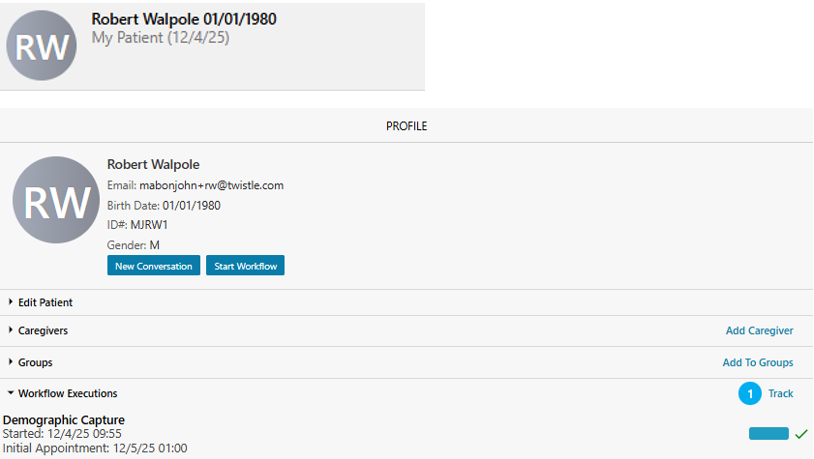
Dates appear in multiple areas of the Twistle application. To improve clarity, the year is now displayed for additional date fields, including the patient join date and workflow start dates.
Ensure practice and group names are displayed in full
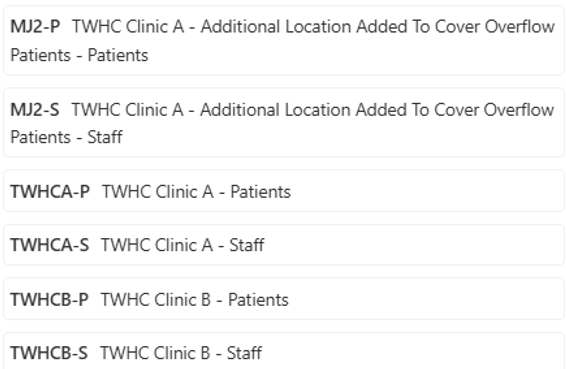
Full practice and group names are now displayed to reduce confusion and improve accuracy. Previously, practice and group names could appear truncated when adding a patient to a group, making it harder to identify the correct location.
Fixes
- Automatically translate fields into Tagalog: When creating a workflow with multiple languages selected, content fields are now correctly translated into Tagalog. Previously, Tagalog translations were not applied.
- Hyperlinks on the Terms of Use page are actionable: Links on the Terms of Use page (including Privacy Policy, Privacy & Security Standards, Notice of Privacy Practices, and DMCA Notice) are now clickable. Previously, these links were displayed as plain text.
- Remove duplicate date of birth from name display: An issue that caused a patient or care team member’s date of birth to appear twice in the name display has been resolved.
- Sync unread and read messages across a care team: Messages in care team conversations now consistently reflect read and unread status across all team members once a message has been opened.
- Ensure custom filters are correctly populated: Custom tracker filters now populate reliably. This resolves an issue where filter options were sometimes incomplete due to a task timeout, which has now been extended.
Twistle - November 2025
New Features and Enhancements
Improved calendar date functionality to support business days
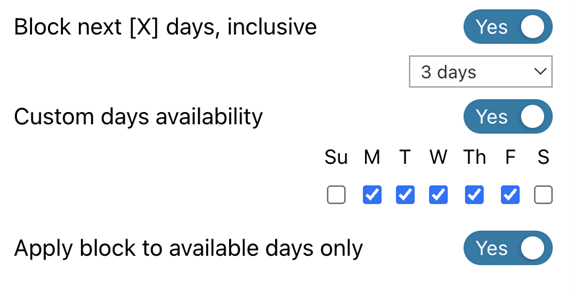
The calendar date picker now includes an option to apply the “block out x days” setting only to selected days, ignoring any unselected days.
Example:
If Monday through Friday are selected and “block out next 3 days” is applied, then:
- With Apply block to available days only selected: Blocking on Friday excludes the weekend, so it blocks Friday, Monday, and Tuesday.
- With Apply block to available days only not selected: Blocking on Friday includes the weekend, so it blocks Friday, Saturday, and Sunday.
Added support for Arabic right-to-left display
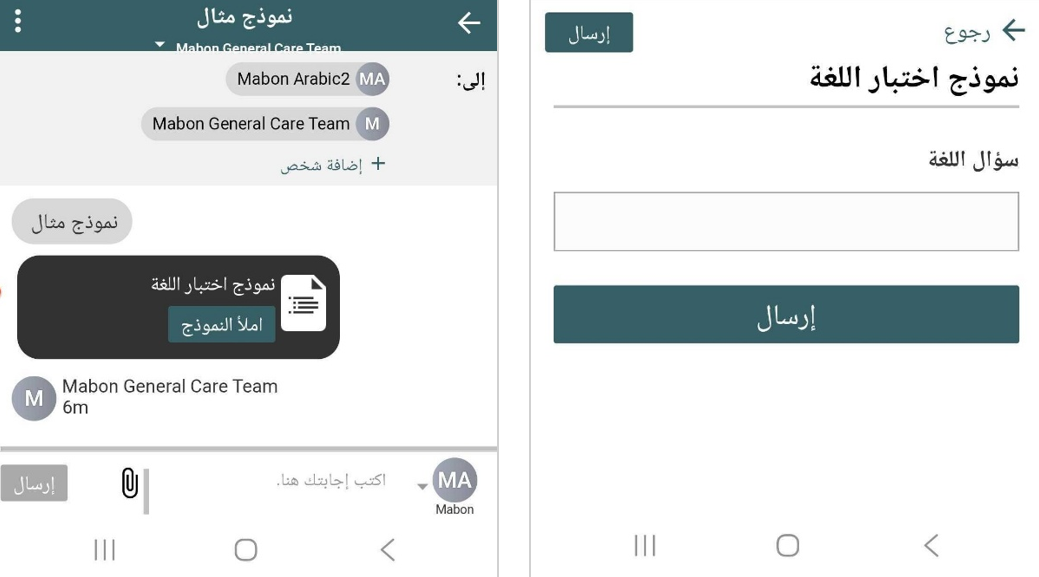
Twistle now supports displaying Arabic from right to left for patient-facing items, aligning with language conventions.
Fixes
- Validating date entries on forms: Previously, a manually entered date was only validated if the Use Text Input option was enabled; now, date validation occurs regardless of this setting.
- Save form field sort order: Previously, reordering fields on a form did not save when navigating away; now, the updated order is retained correctly.
- Terminate workflows when another is started: Previously, starting a new workflow for a patient could terminate an active one even when it shouldn’t; now, only workflows of the same type are terminated when the “one execution per patient” setting is enabled.
- Allow Digital Care to launch without an initial error: Previously, new physicians encountered an error when launching Digital Care for the first time; now, it launches successfully on the first attempt.
Twistle - September 2025
New Features and Enhancements
Improved calendar date functionality
We’ve enhanced the calendar date picker to make scheduling more accurate and intuitive.
- When using the “x days from now” option, the current date is now included in the calculation.
- If a user manually enters a date (instead of using the date picker), Twistle now validates that date against the configured specific days and x days from now rules to ensure it’s allowed.
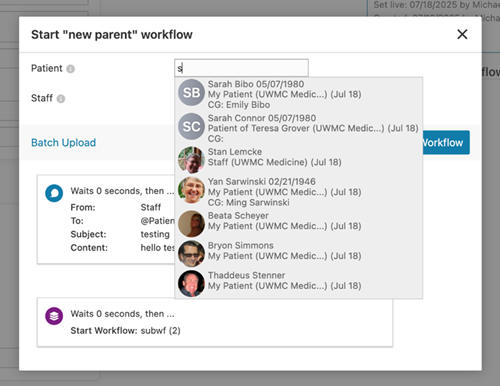
Added date of birth to Workflow Invite List
To help users distinguish between patients with the same name, the Workflow Invite list now includes each patient’s date of birth alongside their name. This improvement reduces the risk of selecting the wrong patient during the invitation process.
Simplified staff member provisioning
The user provisioning API has been updated with a dedicated parameter for creating staff members. This change simplifies setup and prevents staff accounts from being accidentally created using patient workflows.
Refined phone number formatting
Phone number formatting is now more precise:
- When a plain 10-digit number is entered (e.g., 4252414008), Twistle automatically reformats it to a standard format (e.g., 1 (425) 241-4008).
- Other phone number formats will remain unchanged, preserving how they were entered.
Improved handling of conditional question responses
We’ve refined how Twistle manages conditional form questions. If a patient changes an answer that causes a dependent question to be hidden, any previously completed response to that hidden question will now be automatically removed.
This ensures data accuracy and prevents outdated responses from being saved.
Twistle - August 2025
New Features and Enhancements
Patient Invite List/Start Workflow includes date of birth
Because it is possible for patients to have the same first and last name when they’re invited to a practice/added to a workflow, the date of birth is now featured on the match list. This makes it easier to identify the correct patient, instead of accidentally selecting the wrong one.
Control display of available dates in a form question calendar
Questions on patient forms that feature a date field now open a popup calendar, allowing you to select the days of the week available on the calendar and indicate the number of days in the future from which availability can be offered (e.g., block out the next 7 days when the calendar is opened).
New additional lanaguages
Users can now select the following additional languages when creating workflows, allowing more patients to receive messages in the language of their choice:
- Arabic
- Brazilian Portuguese
- Burmese
- Chinese (Simplified)
- French
- Haitian Creole
- Korean
- Russian languages
Twistle - January 2025
New Features and Enhancements
Freeze patient info on the dashboard
New default
Previously, it was difficult to keep track of which patient you were looking at if a workflow dashboard took up the whole screen and you needed to look at a step far into the workflow. With this release, the columns containing patients’ vital information are frozen, so they’ll remain visible not matter how far you scroll.
Add event hooks specifically for form submissions and replies
New default
There are new event hooks for form submissions or replies. Previously, we only had a hook for “do something whenever there’s either a form submission or reply.” An event hook is a workflow-wide piece of logic like “here’s what Twistle should do if this situation arises, no matter which step we’re on.” For example, you might create one to alert staff if a patient doesn’t open a message within three days.
Search the clinical data log viewer
New default
Now, you can search the logs, with results narrowing automatically as you search. Previously, if you were looking for a specific piece of information in clinical logs, you had to manually scroll through pages one-by-one.